<?xml version="1.0" encoding="utf-8"?>
<feed xmlns="http://www.w3.org/2005/Atom">

  <title><![CDATA[Psychic Core Dump]]></title>
  <link href="http://sethfowler.org/atom.xml" rel="self"/>
  <link href="http://sethfowler.org/"/>
  <updated>2013-11-08T13:46:41-08:00</updated>
  <id>http://sethfowler.org/</id>
  <author>
    <name><![CDATA[Seth Fowler]]></name>
    
  </author>
  <generator uri="http://octopress.org/">Octopress</generator>

  
  <entry>
    <title type="html"><![CDATA[CSS Image Orientation Lands in Firefox 26]]></title>
    <link href="http://sethfowler.org/blog/2013/09/13/new-in-firefox-26-css-image-orientation/"/>
    <updated>2013-09-13T15:07:00-07:00</updated>
    <id>http://sethfowler.org/blog/2013/09/13/new-in-firefox-26-css-image-orientation</id>
    <content type="html"><![CDATA[<p>It&rsquo;s never been easier to share your digital photos on the web, thanks to modern
smartphones and digital cameras. For web developers, however, dealing with
user-generated digital images can be far from simple. A significant mismatch
exists between the web, where the orientation of an image is determined by how
its pixels are stored, and digital photography, which increasingly relies on
metadata to mark the image as rotated, storing the pixels in the same
orientation no matter what.</p>

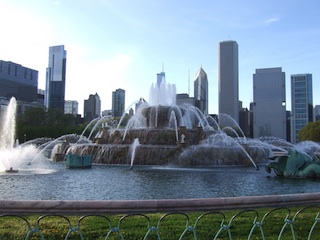
<p>In practice, this means that the user ends up seeing this:</p>

<center><img src="http://sethfowler.org/images/fountain-with-exif.jpg"></center>


<p></p>


<p>When they should&rsquo;ve seen this:</p>

<center><img src="http://sethfowler.org/images/fountain.jpg"></center>


<p></p>


<p>In the real world, the images in question are JPEG images, and the metadata is
the EXIF orientation tag. Current releases of Firefox do not support EXIF
orientation. Chrome and Safari support it when the image is the top-level
document, but not in HTML documents, which means web developers who want to avoid displaying
their users&#8217; vacation pictures sideways have had to choose from several
workarounds, none of which are desirable. <a href="http://stackoverflow.com/questions/7584794/accessing-jpeg-exif-rotation-data-in-javascript-on-the-client-side">Rotating the image using canvas</a>
is inefficient. <a href="http://stackoverflow.com/questions/10810496/adjusting-parent-element-of-css-transformed-image-to-fit-twitter-bootstrap">Applying a CSS transform to rotate the image</a>
interacts with layout in tricky ways. And <a href="http://php.net/manual/en/book.exif.php">server</a>&ndash;<a href="http://exifr.rubyforge.org/api/">side</a> <a href="http://drupalcontrib.org/api/drupal/contributions!imagecache_actions!autorotate!imagecache_autorotate.module/function/imagecache_autorotate_image/6">solutions</a>
require additional work from developers and don&rsquo;t work with images hosted outside
of the developer&rsquo;s control.</p>

<p>Edit: It turns out there <em>is</em> one browser that does respect the EXIF orientation tag
by default in HTML documents: Mobile Safari. (And by extension other browsers on
iOS, like Chrome, which use the same underlying engine.) This is surprising, since
this isn&rsquo;t standards-compliant behavior, and doesn&rsquo;t match what the desktop versions
of these browsers do.</p>

<h2>CSS To The Rescue</h2>

<p>These problems are all solved by the new CSS <a href="http://dev.w3.org/csswg/css-images/#the-image-orientation">image-orientation property</a>,
which is now supported by Firefox 26. When the style
<code>image-orientation: from-image</code> is applied to a JPEG image, the browser will
take its EXIF orientation tag into account when performing layout and rendering.
This means smartphone and digital camera images can now be displayed in their
proper orientation natively by the browser, just by adding a single CSS
property!</p>

<p>Here&rsquo;s the first image in this article again, but this time with
<code>image-orientation</code> applied. If you&rsquo;re using Firefox 26, you&rsquo;ll see this image
rendered as it was intended, with the sky on top and the ground on the bottom.</p>

<figure class='code'> <div class="highlight"><table><tr><td class="gutter"><pre class="line-numbers"><span class='line-number'>1</span>
</pre></td><td class='code'><pre><code class='html'><span class='line'><span class="nt">&lt;img</span> <span class="na">style=</span><span class="s">&quot;image-orientation: from-image&quot;</span> <span class="na">src=</span><span class="s">&quot;fountain.jpg&quot;</span><span class="nt">&gt;</span>
</span></code></pre></td></tr></table></div></figure>


<center><img style="image-orientation: from-image" src="http://sethfowler.org/images/fountain-with-exif.jpg"></center>


<p></p>


<p>Another way to use <code>image-orientation</code> is to specify an orientation directly.
You can provide an angle value to rotate an image by any multiple of 90°:</p>

<figure class='code'> <div class="highlight"><table><tr><td class="gutter"><pre class="line-numbers"><span class='line-number'>1</span>
</pre></td><td class='code'><pre><code class='css'><span class='line'><span class="nt">image-orientation</span><span class="o">:</span> <span class="nt">270deg</span><span class="o">;</span>
</span></code></pre></td></tr></table></div></figure>


<p>This can optionally be followed by a horizontal flip using this syntax:</p>

<figure class='code'> <div class="highlight"><table><tr><td class="gutter"><pre class="line-numbers"><span class='line-number'>1</span>
</pre></td><td class='code'><pre><code class='css'><span class='line'><span class="nt">image-orientation</span><span class="o">:</span> <span class="nt">270deg</span> <span class="nt">flip</span><span class="o">;</span>
</span></code></pre></td></tr></table></div></figure>


<p>This is particularly nice since the order the rotation and flip are applied
matches the order they&rsquo;re written. You can also use <code>flip</code> by itself to mean the
same thing as <code>0deg flip</code>.</p>

<p>When you specify an orientation manually, <code>image-orientation</code> gives CSS the same
capabilities as the EXIF orientation tag.  You can use this to manually correct
JPEGs lacking EXIF data, or to reorient PNGs and other types of images that
can&rsquo;t include orientation information.</p>

<p>The <code>image-orientation</code> property is inherited, which is useful when you want to
apply an orientation to images in generated content pseudo-elements like
<code>:before</code> and <code>:after</code>. It&rsquo;s not possible to style such images directly, but
since they inherit styles from the element to which they&rsquo;re attached, you can
still use <code>image-orientation</code>.</p>

<figure class='code'> <div class="highlight"><table><tr><td class="gutter"><pre class="line-numbers"><span class='line-number'>1</span>
<span class='line-number'>2</span>
<span class='line-number'>3</span>
<span class='line-number'>4</span>
<span class='line-number'>5</span>
<span class='line-number'>6</span>
<span class='line-number'>7</span>
</pre></td><td class='code'><pre><code class='html'><span class='line'><span class="nt">&lt;style&gt;</span>
</span><span class='line'>  <span class="nt">p</span><span class="nd">:before</span> <span class="p">{</span> <span class="k">content</span><span class="o">:</span> <span class="sx">url(bullet.png)</span><span class="p">;</span> <span class="p">}</span>
</span><span class='line'>  <span class="nt">p</span><span class="nc">.ninety</span> <span class="p">{</span> <span class="n">image</span><span class="o">-</span><span class="n">orientation</span><span class="o">:</span> <span class="m">90</span><span class="n">deg</span><span class="p">;</span> <span class="p">}</span>
</span><span class='line'><span class="nt">&lt;/style&gt;</span>
</span><span class='line'>
</span><span class='line'><span class="nt">&lt;p&gt;</span>A generated content image with the default orientation.<span class="nt">&lt;/p&gt;</span>
</span><span class='line'><span class="nt">&lt;p</span> <span class="na">class=</span><span class="s">&quot;ninety&quot;</span><span class="nt">&gt;</span>A generated content image rotated 90°.<span class="nt">&lt;/p&gt;</span>
</span></code></pre></td></tr></table></div></figure>


<p><link rel="stylesheet" type="text/css" href="http://sethfowler.org/stylesheets/generated-content-image-orientation.css"></p>

<div style="display: inline-block; position: relative; left: 50%;">
  <div style="position: relative; left: -50%;">
    <p class="bullet">A generated content image with the default orientation.</p>
    <p class="bullet" style="image-orientation: 90deg">A generated content image rotated 90°.</p>
  </div>
</div>


<p></p>


<h2>Gotchas</h2>

<p>All of this is great, but there are a few rough spots which you should be aware
of when using <code>image-orientation</code>. The most obvious: right now, it&rsquo;s only
supported in Firefox 26, though this will hopefully change quickly. Even as it
becomes available in more and more browsers, though, there will still be things
to watch out for.</p>

<p>As long as <code>image-orientation</code> isn&rsquo;t universally supported, you&rsquo;ll have to be
cautious about its effects on layout. Rotating an image by some angles will
cause its size to change if it isn&rsquo;t square, because its width and height will
be swapped.  This can in turn cause the surrounding layout to change. Most
often, <code>image-orientation</code> will be applied to user-provided images which already
have unpredictable sizes, so it&rsquo;s likely that this won&rsquo;t break your layout.
Still, it&rsquo;s something to consider.</p>

<p>A more subtle point is the user experience for large images being loaded over a
slower connection. Users are used to such images appearing starting at the top.
However, using <code>image-orientation</code> can mean that the first pixels the browser
decodes will appear on the side or the bottom of the image! If the image is
large enough to extend off the bottom of the user&rsquo;s browser window, it may be
less obvious than in the past that an image is downloading. This issue should be
taken into account to ensure a good user experience.</p>

<p>Finally, it&rsquo;s important to be aware that <code>image-orientation</code> only applies to
content images. This means it can&rsquo;t be used with other CSS properties that
accept image values like <code>background-image</code> or <code>list-style-image</code> &mdash; it&rsquo;s
only for <code>&lt;img&gt;</code> tags and generated content.</p>

<h2>Try It Today!</h2>

<p>You can try <code>image-orientation</code> today in <a href="http://nightly.mozilla.org/">Firefox Nightly</a>. If you prefer
not to live quite on the bleeding edge, you&rsquo;ll find it in <a href="http://www.mozilla.org/en-US/firefox/aurora/">Firefox Aurora</a>
starting September 17.</p>

<p>At Mozilla, we&rsquo;ve already found the property very useful internally. Firefox now
displays image documents with EXIF orientation taken into account. This means
that navigating directly to a JPEG image finally produces the same results in
Firefox, Chrome, and Safari. An upcoming version of Thunderbird will also take
advantage of <code>image-orientation</code> to display images in email attachments as they
were intended to be viewed, and we expect to make use of it in the photo gallery
on Firefox OS as well.</p>

<p>As <code>image-orientation</code> becomes more ubiquitous I hope that it will make life a
little easier for web developers and users alike. I look forward to the day when
tilting my head to look at someone&rsquo;s misrotated smartphone pic is a thing of the
past!</p>
]]></content>
  </entry>
  
  <entry>
    <title type="html"><![CDATA[Beginnings]]></title>
    <link href="http://sethfowler.org/blog/2013/08/29/beginnings/"/>
    <updated>2013-08-29T15:51:00-07:00</updated>
    <id>http://sethfowler.org/blog/2013/08/29/beginnings</id>
    <content type="html"><![CDATA[<p>It seems the time has come for me to once again take in hand the blogger&rsquo;s pen.</p>

<p>So here we are, yet another default-theme Octopress blog.</p>
]]></content>
  </entry>
  
</feed>